HR Software Solutions: Features, Types and Tools

Dialflo: AI Voice Agent
May 7, 2026
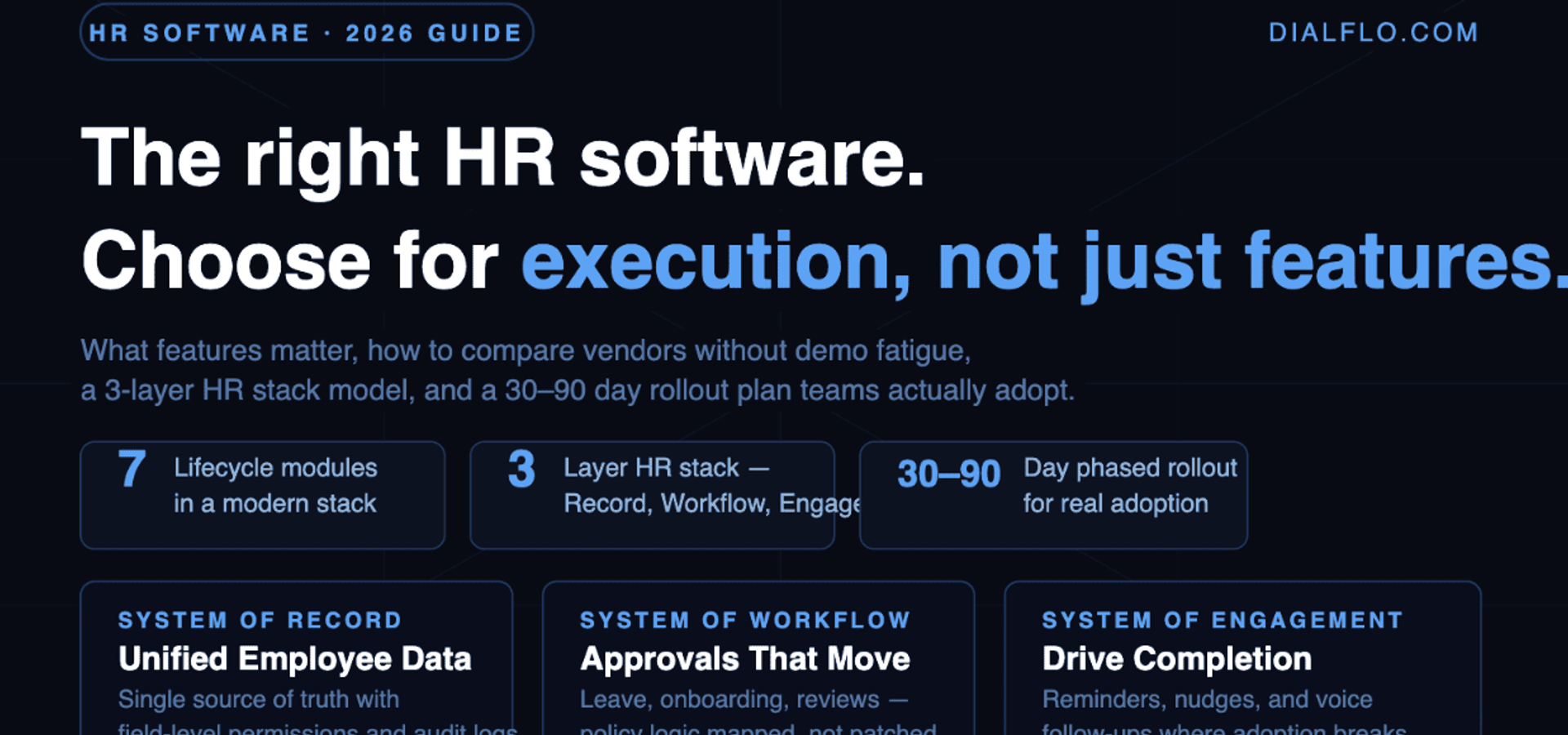
The best HR software solution combines automation, compliance controls, and manager-friendly workflows that teams can use daily.
An HR software solution is no longer optional for growing companies. Once your team crosses a certain size, spreadsheets and scattered tools create invisible friction everywhere: delayed onboarding, inconsistent leave tracking, payroll corrections, missing documents, and managers waiting days for basic employee data. The result is not just admin pain. It affects hiring speed, employee experience, legal compliance, and leadership decision-making.
This guide breaks down the practical side of HR software selection: what features matter most, which tool categories fit different business stages, how to compare vendors without getting lost in demos, and how to implement in a way people actually adopt. If your goal is to reduce manual work while improving process quality, this article gives you a field-tested framework.
Why HR software has become a business-critical system
HR technology is now tied directly to productivity and retention. According to Gartner, employee experience and manager effectiveness are major themes in HR technology adoption as organizations digitize workflows and expect more from people operations teams. The trend is clear: HR is shifting from back-office administration to a strategic operating function.
Source: Gartner HR Technology.
At the same time, organizations face pressure to hire faster and retain better talent. LinkedIn's workplace and hiring insights repeatedly show how candidate experience, communication speed, and structured hiring processes influence outcomes. Without a connected system, those workflows become fragmented and hard to scale.
Source: LinkedIn Talent Solutions Resources.
For most companies, the core problem is not lack of effort. It is operational fragmentation. Recruitment data sits in one platform, employee records in another, payroll in another, and approvals in email threads. A good HR software solution connects those workflows so teams spend less time chasing information and more time making decisions.
What an HR software solution actually covers
Many buyers assume HR software means only payroll or attendance. In reality, modern platforms span the full employee lifecycle. Depending on your size and maturity, you may need all modules or only a subset at first.
Core HRIS. Central employee data, org structure, role history, and document storage.
Recruitment and applicant tracking. Job posting, pipeline stages, interview scheduling, and offer workflows.
Onboarding. Checklist automation, document collection, policy acknowledgments, and first-week task assignment.
Time, attendance, and leave. Shift logic, leave policies, calendars, and approval routing.
Payroll and compensation. Salary components, deductions, reimbursements, and compliance-ready reporting.
Performance and engagement. Goal setting, reviews, feedback cycles, pulse surveys, and development plans.
HR analytics. Dashboards for hiring velocity, attrition, absenteeism, manager response time, and policy adherence.
The strongest implementations start with 2-3 high-friction workflows first, then expand. Trying to digitize every HR process in one phase usually slows adoption.
Key features to prioritize before buying
Vendor demos can look polished, but most long-term success depends on a practical feature set that reduces daily friction. Use this checklist to stay grounded during evaluations.
1) Unified employee records with permission controls
A single source of truth for employee data is foundational. Look for field-level permissions, audit history, and role-based access so managers, HR, finance, and leadership each see only what they need. This reduces errors and improves confidentiality.
2) Workflow automation that matches your policies
Approval chains for leave, expense claims, role changes, and onboarding tasks should reflect your real operating model. If a system cannot map your policy logic without custom engineering, adoption risk rises fast.
3) Payroll readiness and compliance support
Even if payroll is handled in a separate system, your HR platform should provide export-ready structures, validation checks, and compliance fields. Compliance mistakes are expensive and can damage trust quickly.
4) Reporting that supports operational decisions
Useful dashboards should answer practical questions: where hiring pipelines stall, which teams have highest absenteeism, how onboarding completion differs by function, and where manager approvals create bottlenecks.
5) Integration capability
At minimum, confirm integration options for payroll, accounting, communication tools, and identity systems. An HR software solution that works in isolation often recreates manual data transfer work.
6) Employee and manager usability
If requesting leave, approving documents, or submitting performance feedback takes too many clicks, people bypass the system. During trials, test mobile and desktop usability with real managers, not only HR admins.
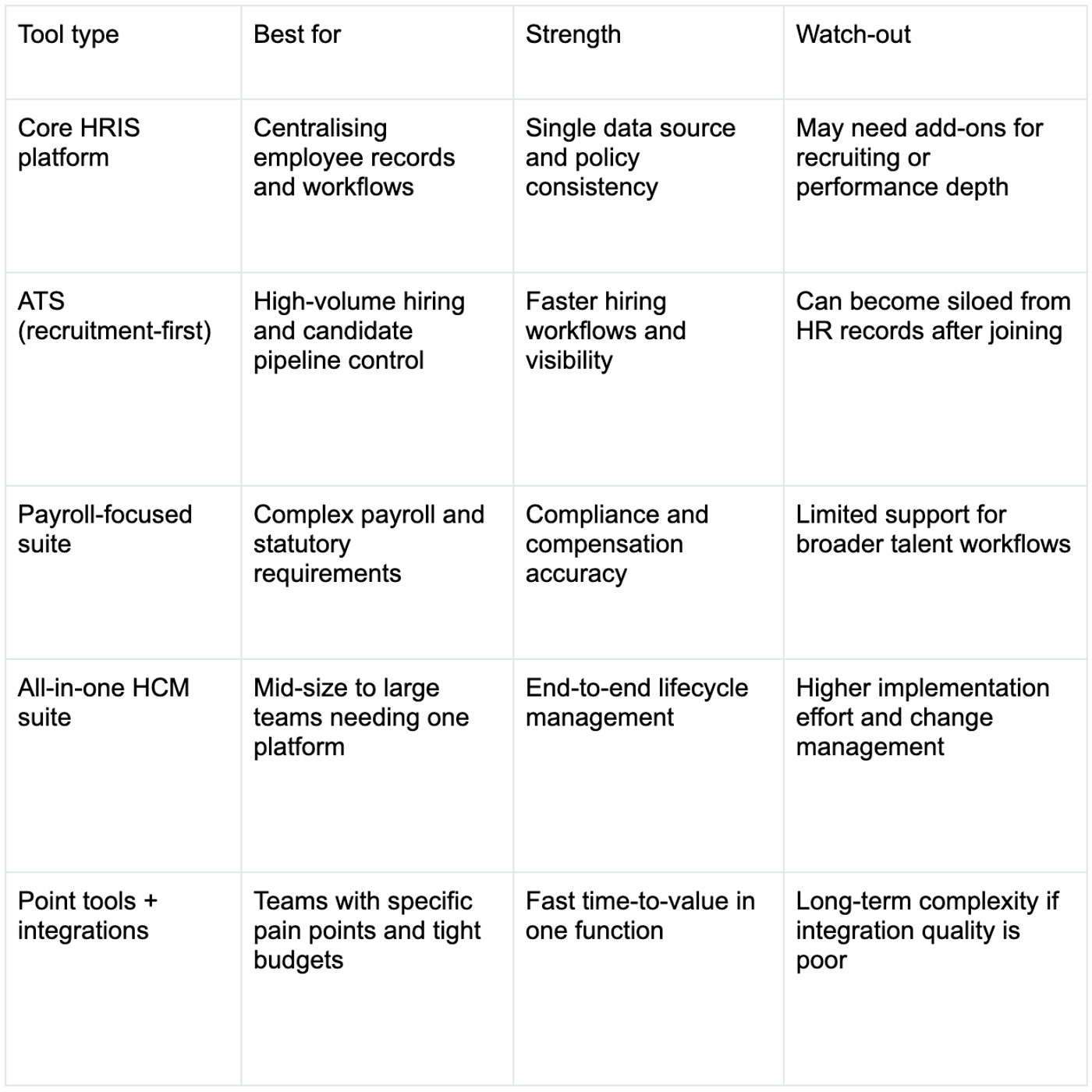
Types of HR software tools and best-fit use cases
How to evaluate vendors without wasting cycles
Most teams over-index on feature volume and under-index on execution fit. A better approach is to run a short evaluation process tied to real scenarios.
Step 1: Define top 10 workflows. Example: new hire onboarding, leave approval, shift change, salary revision, performance review setup.
Step 2: Score by workflow completion. Can the tool execute each workflow end-to-end without manual patchwork?
Step 3: Test with real users. Include one recruiter, one HR ops person, two line managers, and one finance stakeholder.
Step 4: Validate implementation support. Ask for migration scope, training plan, and post-go-live support model.
Step 5: Request measurable outcomes. Vendors should map capability to expected improvements, not just list modules.
This process keeps buying decisions grounded in operational reality. It also helps avoid the common mistake of purchasing enterprise-grade complexity when the team needs practical reliability first.
Common implementation mistakes and how to avoid them
Even a strong HR software solution can fail if rollout discipline is weak. These are the most common pitfalls:
- Trying to launch everything at once. Start with core data, attendance or leave, and onboarding. Expand in phases.
- Ignoring data cleanup. Legacy records with duplicate fields or inconsistent naming cause downstream reporting issues.
- No policy mapping owner. Assign clear ownership for leave, approval, and compensation logic before configuration.
- Weak manager training. Manager adoption matters as much as HR admin readiness.
- No baseline metrics. Without before-and-after data, ROI conversations become subjective.
One practical method is a 30-60-90 rollout cadence. In the first 30 days, finalize workflows and clean data. In days 31-60, run pilot teams with controlled feedback loops. In days 61-90, scale with manager training and governance checks.
Cost models and ROI: what to expect
Pricing structures vary, but most HR software tools use per-employee-per-month or module-based tiers. The total cost includes more than license fees. Include implementation effort, migration, training, integration work, and internal project time.
To measure ROI credibly, track a limited set of operational metrics:
- Admin efficiency: HR hours spent per payroll cycle, onboarding setup time, request resolution time.
- Hiring efficiency: time-to-hire, interview no-show rate, offer acceptance speed.
- Quality and compliance: payroll correction rate, missing document count, policy violations.
- Employee experience: onboarding completion rate, employee query turnaround, manager response SLAs.
SHRM and other HR industry resources emphasize the cost impact of turnover, onboarding quality, and manager effectiveness. Even modest improvements in process consistency can create material savings, especially for distributed or fast-growing teams.
Source: SHRM.
Original operating framework: the 3-layer HR stack
Most comparison guides list features. A more useful lens is to treat your HR software solution as a three-layer operating system:
Layer 1: System of record. Accurate employee, role, and policy data. This is your compliance and reporting foundation.
Layer 2: System of workflow. Approvals, onboarding tasks, hiring stages, and manager actions that move work forward.
Layer 3: System of engagement. Employee communication, reminders, nudges, and support touchpoints that drive completion.
Many teams invest in layer 1 and partially in layer 2, but underinvest in layer 3. That is where adoption often breaks. A process can be perfectly configured, but if reminders and interactions are delayed, tasks stay incomplete.
This is where adjacent automation can help. Dialflo is an AI voice agent platform that can support repetitive HR communication workflows like interview confirmations, candidate follow-ups, document reminders, and onboarding calls. It is not a replacement for an HRIS, but it can strengthen the engagement layer where many rollouts lose momentum.
Who should own HR software selection?
Ownership should be cross-functional from day one. HR should lead policy and workflow decisions, finance should validate payroll and compliance impacts, IT should validate security and integration standards, and business managers should represent day-to-day usability needs.
A practical governance setup includes a project owner, a process owner per module, and a monthly review rhythm after go-live. This prevents the system from becoming static as your org structure and policies evolve.
FAQ: HR software solution
What is an HR software solution?
An HR software solution is a digital platform that helps organizations manage core people workflows such as hiring, onboarding, attendance, payroll, compliance, and performance from one connected environment.
Which HR software features should we implement first?
Start with employee records, onboarding checklists, leave and attendance workflows, and payroll-ready data structures. These usually deliver the fastest operational gains and reduce admin errors quickly.
How do we choose between all-in-one and point solutions?
If your workflows are highly fragmented, an all-in-one platform may reduce long-term complexity. If one function is the urgent bottleneck, a focused point tool can provide faster short-term value with lower rollout effort.
How long does implementation take?
A focused implementation often takes 4-12 weeks for the first phase, depending on data quality, integration complexity, and internal change management readiness.
How can we improve adoption after go-live?
Prioritize manager training, short SOPs, and automated reminders. Track completion metrics weekly in the first 90 days and fix friction points quickly instead of waiting for quarterly reviews.
How does Dialflo fit into HR operations?
Dialflo supports communication-heavy workflows through AI voice agents, including interview confirmations and follow-up calls. It can complement your HR software solution by reducing missed outreach and improving process completion speed.
Closing: choose for execution, not just features
The right HR software solution is the one your team will actually use every day. Prioritize workflow fit, data reliability, manager usability, and measurable outcomes over feature checklists alone. Start with high-friction processes, implement in phases, and build governance early.
When your HR stack combines strong systems of record with fast execution and communication, people operations shifts from reactive administration to strategic leverage. That is when software becomes a capability, not just a subscription.
Already have HR software but still stuck on phone screens? Book a Dialflo demo to see a voice agent screen candidates and write the results to your ATS.