How to Use AI to Prepare for Interviews in 2026

Dialflo: AI Voice Agent
May 27, 2026
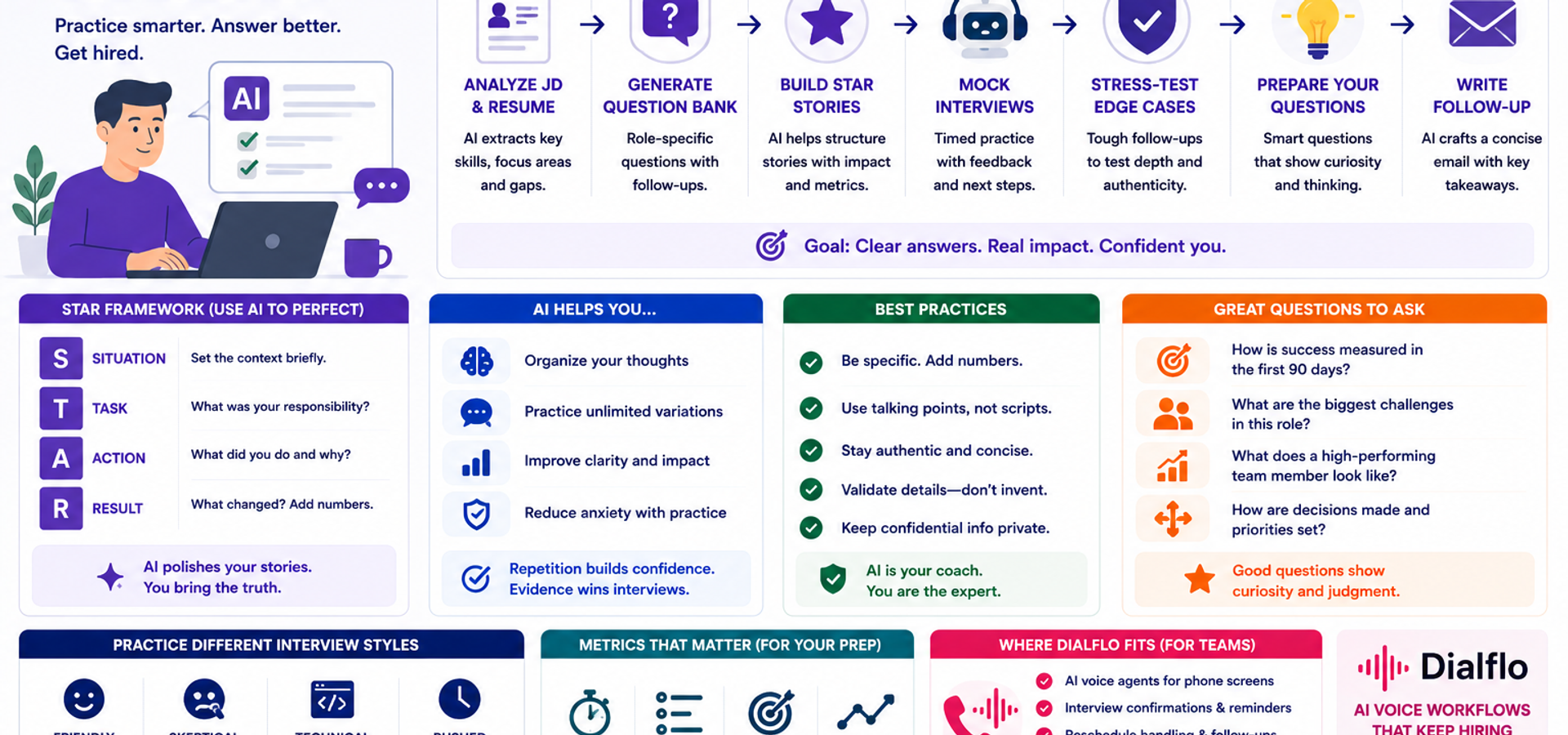
Interview prep used to mean reading company blogs, memorizing “tell me about yourself,” and hoping the questions match what you practiced. Now candidates can simulate realistic interviews, generate tailored question sets, and tighten their answers, if they use AI the right way. This guide shows how to use AI to prepare for an interview step by step, without sounding generic or inventing achievements.
If you’re looking for tools, start with best AI interview practice tools for candidates. For recruiter-side context on how interviews are becoming more structured with AI, see interview intelligence and artificial intelligence in recruitment.
Why AI helps interview prep (the honest reason)
AI is good at two things that matter for prep:
- Structure: turning vague answers into clear, competency-based responses
- Repetition: generating endless variations and follow-ups until you stop freezing
And structure matters. Google’s structured interviewing guidance notes that rejected candidates who experienced structured interviews were 35% happier than those who didn’t, because the process feels more fair and consistent. Source: Google re:Work: structured interviewing.
Step-by-step: how to use AI to prepare for an interview
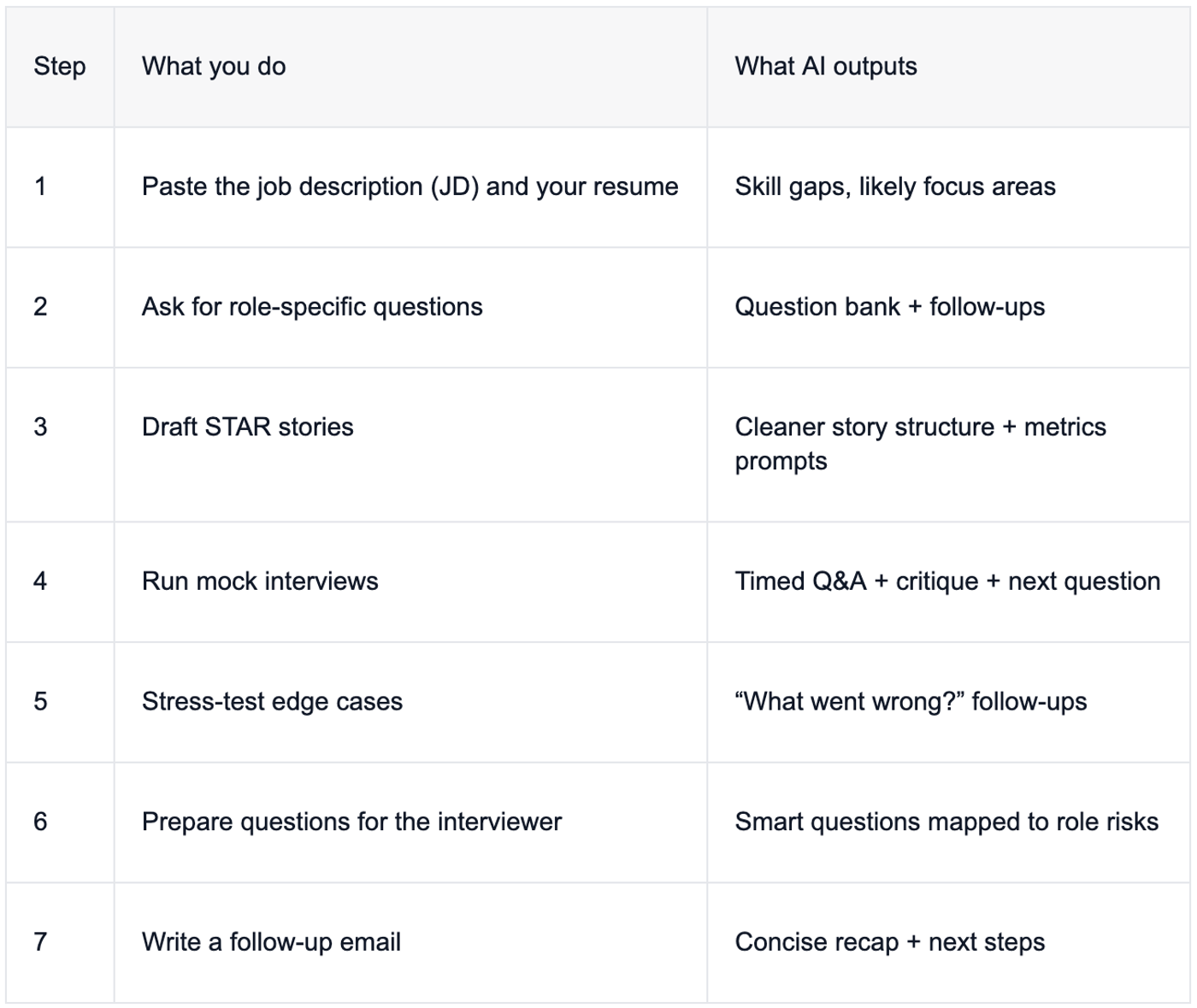
Step 1: Translate the JD into competencies (what you’ll be scored on)
Most interviews measure a small set of competencies: role skills, problem solving, communication, ownership, and collaboration. Ask AI to convert the JD into:
- 5–8 competencies
- what “strong” looks like for each
- 2 questions per competency
Then cross-check with your resume and note where you have evidence. If you’re unsure how questions are designed, see generate interview questions from job description using AI.
Step 2: Build a question bank that matches the role level
Ask AI for a bank of:
- behavioral questions (“Tell me about a time…”)
- situational questions (“What would you do if…?”)
- role-specific technical questions (scaled to your seniority)
- clarifying follow-ups interviewers use to test authenticity
If you’re a candidate, the goal is not memorizing answers. It’s building confidence across question shapes.
Step 3: Draft STAR stories (but keep them real)
AI is excellent at making stories coherent. Use it to:
- trim unnecessary context
- add missing decision details (trade-offs, constraints)
- prompt metrics (“How long? How many? What changed?”)
Hard rule: never let AI invent results. If you can’t defend the details under follow-up, it will backfire.
Step 4: Run mock interviews with escalating difficulty
Do three rounds:
- Round 1: slow, coaching mode
- Round 2: timed answers (60–120 seconds)
- Round 3: adversarial follow-ups (“What would you do differently?”)
AI can also simulate different interviewer styles: friendly, skeptical, very technical, or rushed. The point is to reduce surprise.
Step 5: Prepare for “weakness” questions without self-sabotage
Ask AI to help you answer:
- “Tell me about a conflict”
- “Tell me about a failure”
- “Why did you leave?”
Good answers show accountability and learning. Avoid blaming old teams or sounding like you have never made a mistake.
Step 6: Prepare your questions for them (this is part of evaluation)
Ask AI to propose 8–10 questions, then keep 3–5. Good categories:
- how success is measured in 90 days
- what “good” looks like for the team
- biggest risks/constraints in the role
- how decisions are made and conflicts are resolved
Step 7: After the interview, use AI to write a better follow-up
Right after the call, write bullet notes: what you discussed, what you committed to send, what you learned. Then ask AI to turn it into a short follow-up email that:
- thanks them
- recaps 1–2 relevant strengths
- answers any open question
- states next steps
Pitfalls: how AI interview prep goes wrong
- Generic answers. Fix by adding numbers, constraints, and your decisions.
- Over-rehearsed script. Use talking points, not memorization.
- Hallucinated achievements. Never invent metrics or projects.
- Leaking sensitive data. Don’t paste confidential employer info into public tools.
Talent teams are increasingly using AI to save time and focus on higher-value evaluation work. LinkedIn’s Future of Recruiting 2025 highlights that AI time savings are often redirected to screening and skill assessment, meaning interviews can become more structured, not less. Source: LinkedIn: Future of Recruiting 2025.
Unique angle: prepare for “structured” interviews, not “trick” interviews
Many candidates prepare for gotchas. Many modern interviews are actually structured: consistent questions, rubrics, and evidence-based scoring. That is good news, because it means you can prepare systematically. Use AI to practice the structure and stress-test your evidence.
Where Dialflo fits (context for candidates)
Dialflo is designed for recruiting teams, but candidates benefit when hiring becomes more structured and predictable. AI voice workflows, screens, confirmations, reschedules, reduce coordination friction so interviews happen faster and with clearer expectations. For how teams evaluate interviews, see interview intelligence.
FAQ: how to use AI to prepare for an interview
What’s the best prompt to start with?
Ask AI to extract competencies from the JD, then generate a question bank with follow-ups and a scoring rubric.
Can AI help with technical interviews?
Yes, practice question sets and explanations. Still validate with real exercises and avoid memorizing answers you can’t explain.
How do I avoid sounding like AI wrote my answer?
Add specific numbers, decisions, and trade-offs from your real experience; keep your natural speaking style.
Should I use AI during a live interview?
Only if explicitly allowed. Otherwise, use AI before and after the interview for prep and follow-up.
Does AI make interviews easier?
It can make you more prepared. Interviews may also become more structured as employers adopt AI, which rewards clear evidence and competency-based answers.
Where can I find AI tools for practice?
Start with best AI interview practice tools for candidates for options and how to use them safely.
Closing: use AI for structure, not for pretending
How to use AI to prepare for an interview is simple: turn the JD into competencies, practice realistic questions with follow-ups, tighten STAR stories, and show up with evidence, not buzzwords. Use AI to reduce anxiety through repetition, then communicate like a human.
Want to understand how hiring teams use AI around interviews? Explore Dialflo and related interview workflow content on the blog.