How to Integrate Recruiting Software with Existing Systems

Dialflo: AI Voice Agent
May 16, 2026
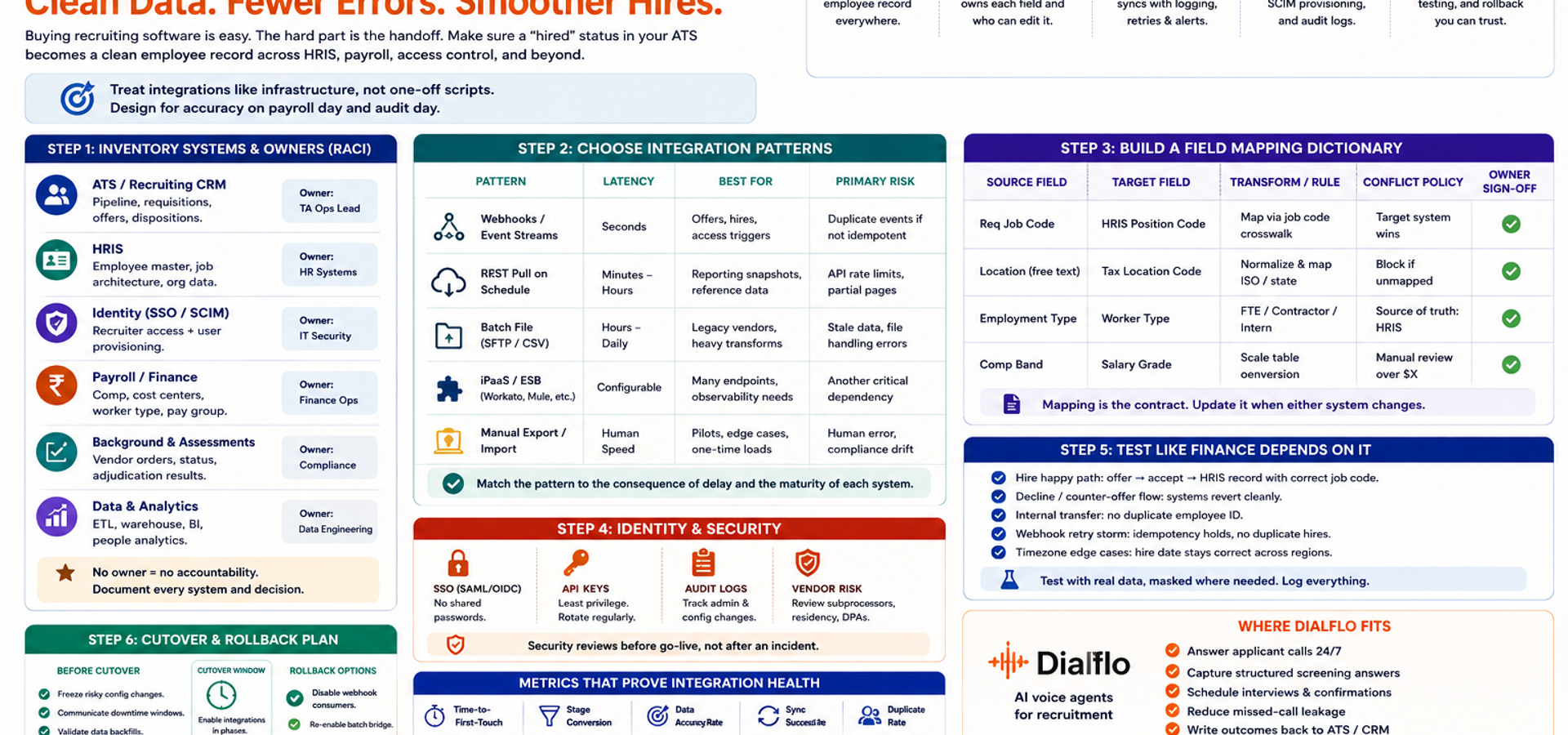
Buying recruiting software is the easy part. The hard part is the handoff: making sure a “hired” status in your ATS becomes a clean employee record in HRIS, payroll, and access control, without duplicate profiles, wrong cost centers, or a security team that only hears about the integration after go-live. Teams that integrate recruiting software with existing systems well treat the project like infrastructure, not a one-off script. If you are searching how to integrate recruiting software with existing systems, you are really asking for a playbook that survives payroll week.
This guide walks a practical integration path: inventory systems, pick patterns (API vs batch), align data dictionaries, harden identity, test like finance depends on it (because it does), and cut over in phases. For broader HR tech context, read HR software solutions: features, types, and tools and cloud-based recruitment software: benefits and tools. For voice layers that must plug into real stacks, see build vs buy voice AI stack in India (2026) and Dialflo.
What “integrate recruiting software with existing systems” actually includes
Most enterprises do not have one “HR system.” They have a mesh: ATS, CRM, HRIS, payroll, identity (SSO/SCIM), background checks, e-signature, LMS, ticketing, and a data warehouse or lake for analytics. When you integrate recruiting software with existing systems, you decide which system is authoritative for each field and how updates propagate.
If you skip that authority map, you will ship an integration that “works” in demo—and silently forks truth in production.
Step 1: Inventory systems and owners (the integration RACI)
Before any API keys, list every touchpoint for candidate and employee data. Assign owners:
- ATS / recruiting CRM: pipeline stages, reqs, offers, disposition reasons.
- HRIS: employee master, job architecture, manager hierarchy.
- Identity (IdP): SSO login for recruiters; SCIM for user provisioning.
- Payroll / finance: hire dates, comp, cost centers, worker types.
- Background & assessments: vendor order status and adjudication.
- Analytics: warehouse ETL, BI tools, people analytics models.
SHRM’s HR technology resources are a useful starting point for aligning HR and IT stakeholders on governance and change management when new HR tools enter the stack: SHRM: HR technology.
Step 2: Choose integration patterns that match risk and latency
Not every field needs real-time sync. When you integrate recruiting software with existing systems, match pattern to consequence of delay.
Real-time (webhooks / event streams)
Use when downstream systems must react immediately: offer accepted → generate onboarding tasks; hired → create enterprise ID. Demand idempotent webhook handlers so retries do not duplicate hires.
Scheduled batch (nightly or hourly)
Use for analytics-friendly syncs, historical backfills, or vendors with weak real-time APIs. Batch reduces API load but increases reconciliation work when something fails mid-file.
iPaaS / middleware
Tools like Workato, MuleSoft, or Boomi speed delivery when you have many endpoints and need visual monitoring. Tradeoff: another system to secure and monitor.
Human-in-the-loop CSV
Sometimes the fastest safe path is a controlled export for edge vendors. Document who may run it and how files are destroyed after upload.
Step 3: Build a field mapping dictionary (the document that prevents payroll fires)
Create a shared table: source field, target field, transform rule, nullability, conflict policy, and owner sign-off. Pay special attention to:
- Job codes that differ between ATS requisitions and HRIS positions.
- Location tax codes vs “office nickname” strings recruiters type.
- Employment type (FTE, contractor, intern) and eligibility flags.
- Personal data that should never copy to the wrong sandbox.
LinkedIn’s Future of Recruiting research notes that talent teams using generative AI report meaningful weekly time savings—time you can reinvest into integration hygiene and recruiter training if you automate responsibly. Source: LinkedIn: Future of Recruiting 2025.
Step 4: Identity, least privilege, and API security
Recruiting stacks hold sensitive PII. When you integrate recruiting software with existing systems, treat integrations like production apps, not side scripts.
- Use SSO (SAML/OIDC) for recruiter access; avoid shared admin passwords.
- Rotate API keys; scope tokens to minimum permissions.
- Log admin changes and integration configuration edits.
- Review vendor subprocessors and data residency before enabling cross-border sync.
For API-specific threat patterns (broken auth, excessive data exposure), OWASP’s API Security Project is a practical checklist for engineering reviews: OWASP API Security Project.
Step 5: User provisioning (SCIM) and offboarding
Integrations are not only about candidates. When recruiters join or leave, role-based access in ATS, CRM, and voice tools must update automatically. SCIM provisioning from your IdP reduces stale seats and orphan accounts—common audit findings after fast hiring spikes.
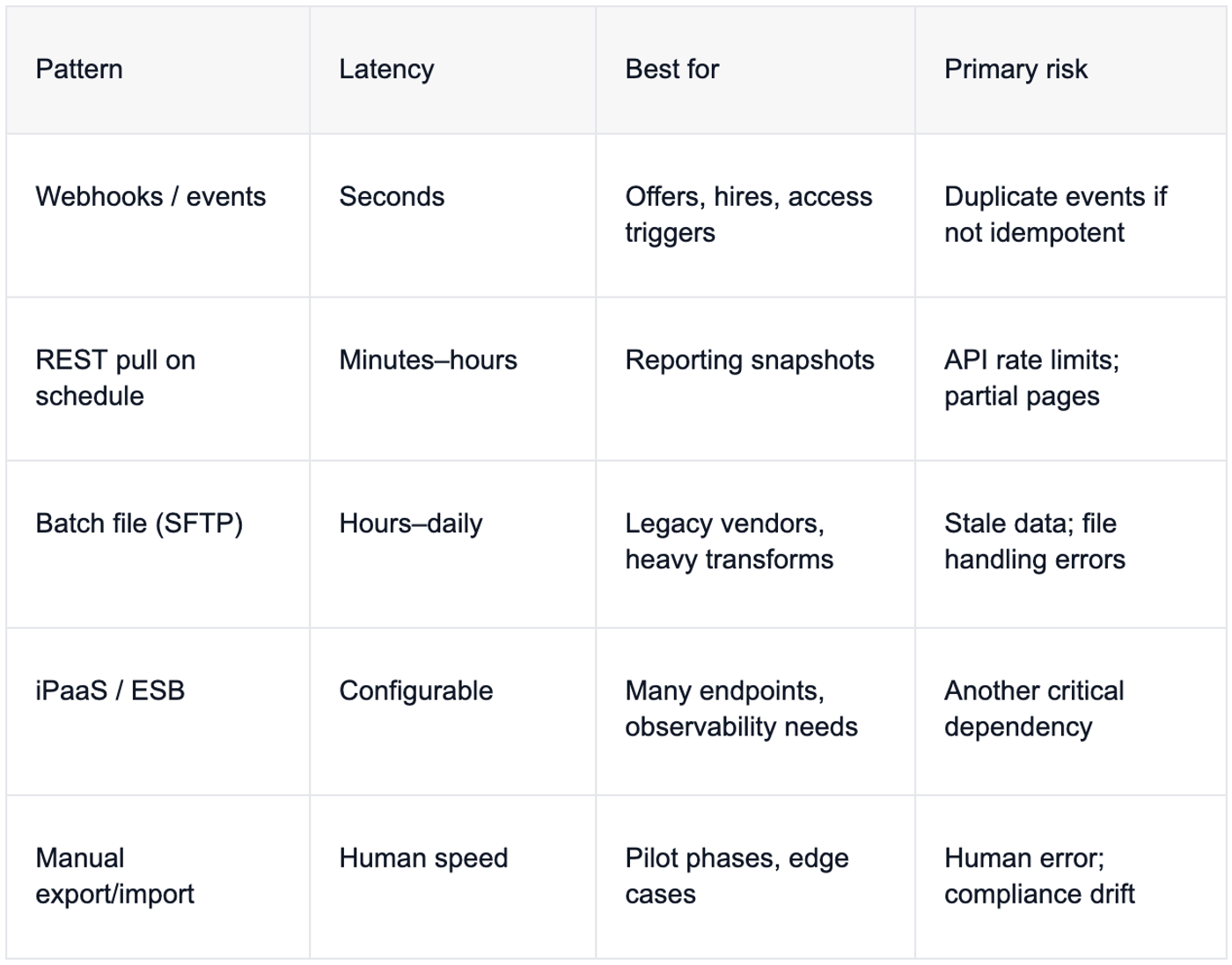
Comparison table: integration patterns at a glance
Use this table in steering committees when someone asks “why not just CSV everything?”
Step 6: Testing and user acceptance (UAT) that finance will sign
Minimum UAT scenarios before production when you integrate recruiting software with existing systems:
- Hire happy path: offer → accept → requisition close → HRIS profile created with correct job code.
- Counter-offer / decline: candidate declines after accept; systems revert cleanly.
- Internal transfer: existing employee applies; no duplicate employee ID.
- Webhook retry storm: vendor sends duplicates; your system stays idempotent.
- Timezone edge: hire date does not shift a day across regions.
For migration discipline (useful when replacing a vendor mid-stream), borrow patterns from how to migrate from Retell to Dialflo without downtime—shadow traffic, rollback triggers, and staged cutover thinking apply beyond voice vendors.
Step 7: Cutover plan and rollback (write this before you need it)
Define a maintenance window, freeze risky config changes, and keep a “break glass” path: disable webhook consumers, re-enable CSV bridge, or revert to prior ATS stage mapping. Communicate to recruiters what will pause for thirty minutes versus what must never pause (careers site apply flow).
Analytics after you integrate recruiting software with existing systems
Once events land in the warehouse, validate row counts against ATS exports for a week. Small percentage drift usually means mapping bugs, not “random warehouse weirdness.”
If you are also instrumenting funnel speed, pair this project with best recruitment analytics software guidance so dashboards match the definitions hiring managers already use.
Unique angle: treat integrations as a product with SLAs
Most integration projects are “projects.” High-performing teams run them as products: on-call rotation for webhook failures, monthly reconciliation reports, and a backlog for schema drift when HRIS updates job architecture.
That single mindset shift prevents the classic post-go-live decay where recruiters invent shadow spreadsheets “because the integration is wrong again.”
Where Dialflo fits in a connected recruiting stack
Voice touchpoints should write structured outcomes back to the same systems of record you mapped in Step 1. Dialflo provides AI voice agents for recruitment that can slot into high-volume phone workflows—screening answers, confirmations, reschedules—so recruiters do not maintain a parallel phone log outside the ATS.
When you integrate recruiting software with existing systems, voice is just another producer of events. It needs the same logging, PII handling, and retry discipline as any other webhook source.
FAQ: integrate recruiting software with existing systems
What does it mean to integrate recruiting software with existing systems?
It means connecting recruiting tools to HRIS, identity, payroll, and analytics so data updates once, flows correctly, and stays auditable across the hire lifecycle.
What integration patterns are most common?
Webhooks and REST APIs for real-time updates, scheduled jobs for analytics, iPaaS for multi-vendor glue, and SFTP/CSV for legacy endpoints.
Who should own the project?
TA ops for requirements and UAT, IT/security for access and vendor risk, HRIS for employee master data rules, finance when comp or cost centers are touched.
Which fields break most often?
Manager ID, job code, location, employment type, and hire date mismatches are the usual suspects that break payroll and headcount reporting.
How should we test before go-live?
Sandbox first, then parallel validation on a small cohort, including webhook retry tests and decline/withdraw paths—not only the happy hire.
How does Dialflo integrate?
Dialflo focuses on voice-first candidate interactions and structured capture that should feed ATS workflows; check dialflo.ai for current integration options and security documentation.
Closing: integrations are never “done”
When you integrate recruiting software with existing systems, go-live is day one of operations. Keep ownership clear, monitor webhooks like revenue-critical infrastructure, and revisit field mappings whenever HRIS changes job architecture or payroll adds a new entity.
If phone workflows are part of your stack, explore Dialflo as a voice layer designed to reduce coordination latency without fighting your ATS as the system of record.