Automated Check-Call Logging for McLeod PowerBroker

Dialflo: AI Voice Agent
June 11, 2026
It is 2:15 p.m. in Chicago. Forty loads need a McLeod PowerBroker check call before the 3:00 p.m. window closes. Your coordinators are still logging the 9:00 a.m. batch, dial, ask for city and state, update ETA, type notes into PowerBroker, repeat. Manual carrier check-call logging does not scale when Midwest lane volume spikes or a lake-effect storm reshuffles every appointment on the board.
Chicago freight brokers run on McLeod PowerBroker because it fits brokerage workflows, loads, trips, carriers, appointments, and check-call history in one TMS. The bottleneck is not the software. It is the repetitive outbound calls and note entry that eat dispatch capacity. This guide covers how operators automate carrier check call logging into PowerBroker, what to write back, and how to pilot without losing exception judgment.
What McLeod PowerBroker check calls actually require
In PowerBroker, a check call is more than a phone tag. Dispatch confirms:
- current location (city, state, or mile marker)
- on-time status vs planned ETA
- pickup or delivery appointment confirm
- delay reason if applicable (traffic, detention, weather, mechanical)
- next check-call time or milestone
Each result becomes a check-call note on the load or trip, audit trail for shippers, billing, and exception handling. When logging is manual, notes lag reality. Shippers call before notes exist. That is the loop automated carrier check call logging breaks.
Why Chicago brokers feel check-call pain first
Chicago is one of the densest freight brokerage markets in North America, O'Hare corridor distribution, Midwest cross-dock volume, and year-round weather volatility. Local operators on PowerBroker often run:
- higher check-call frequency on short-haul Midwest lanes
- tighter warehouse appointment windows south and west of the city
- winter delay cascades that force hourly location updates
- mixed asset and brokerage books sharing the same dispatch desk
Volume plus appointment pressure means coordinators spend half the day on dial-and-log work instead of re-powers and detention. Broader call-volume context: AI voice agents for thousands of routine logistics calls and reducing dispatcher call load by 70%.
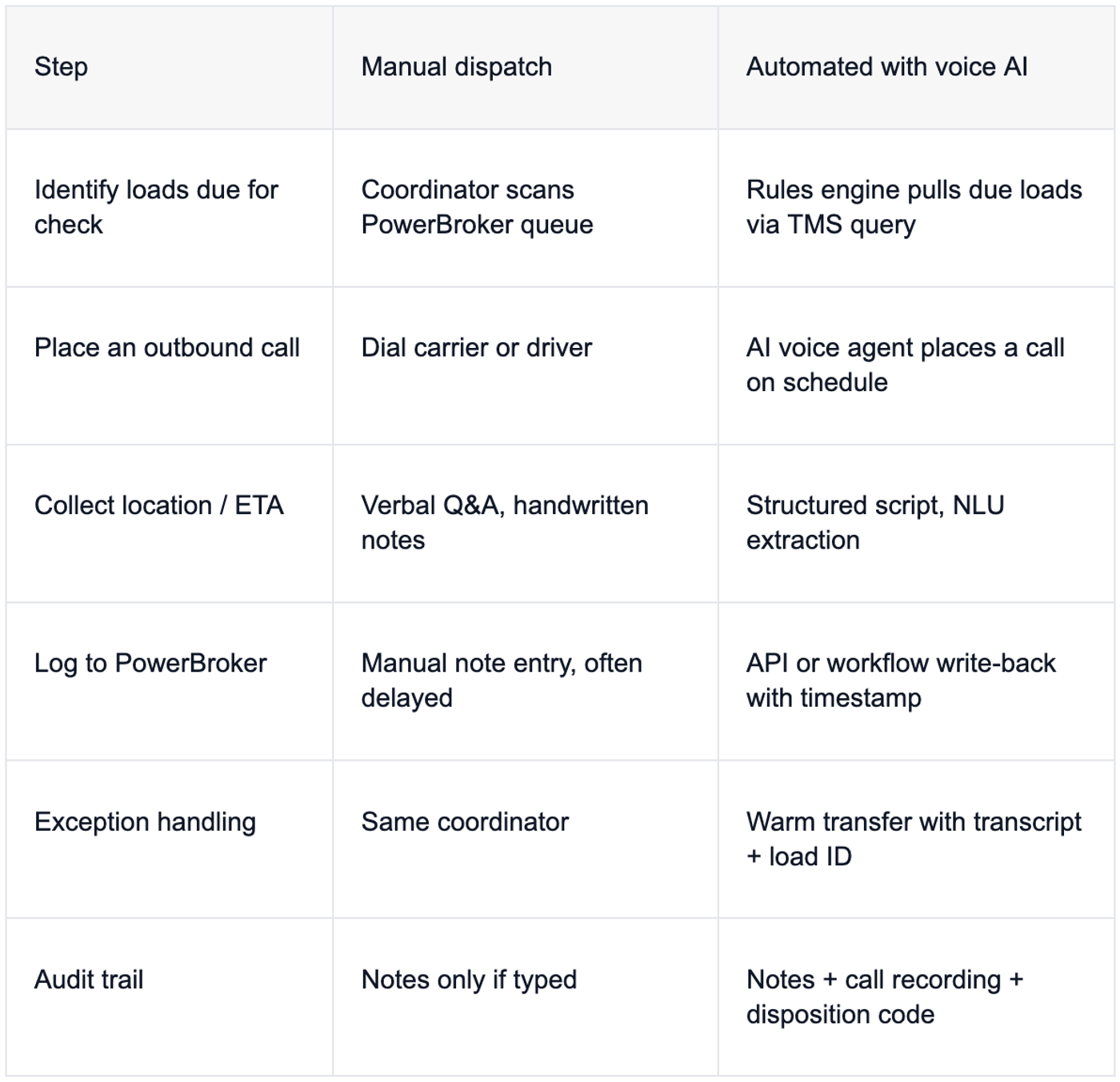
Manual vs automated check-call logging in PowerBroker
How automated carrier check-call logging works with PowerBroker
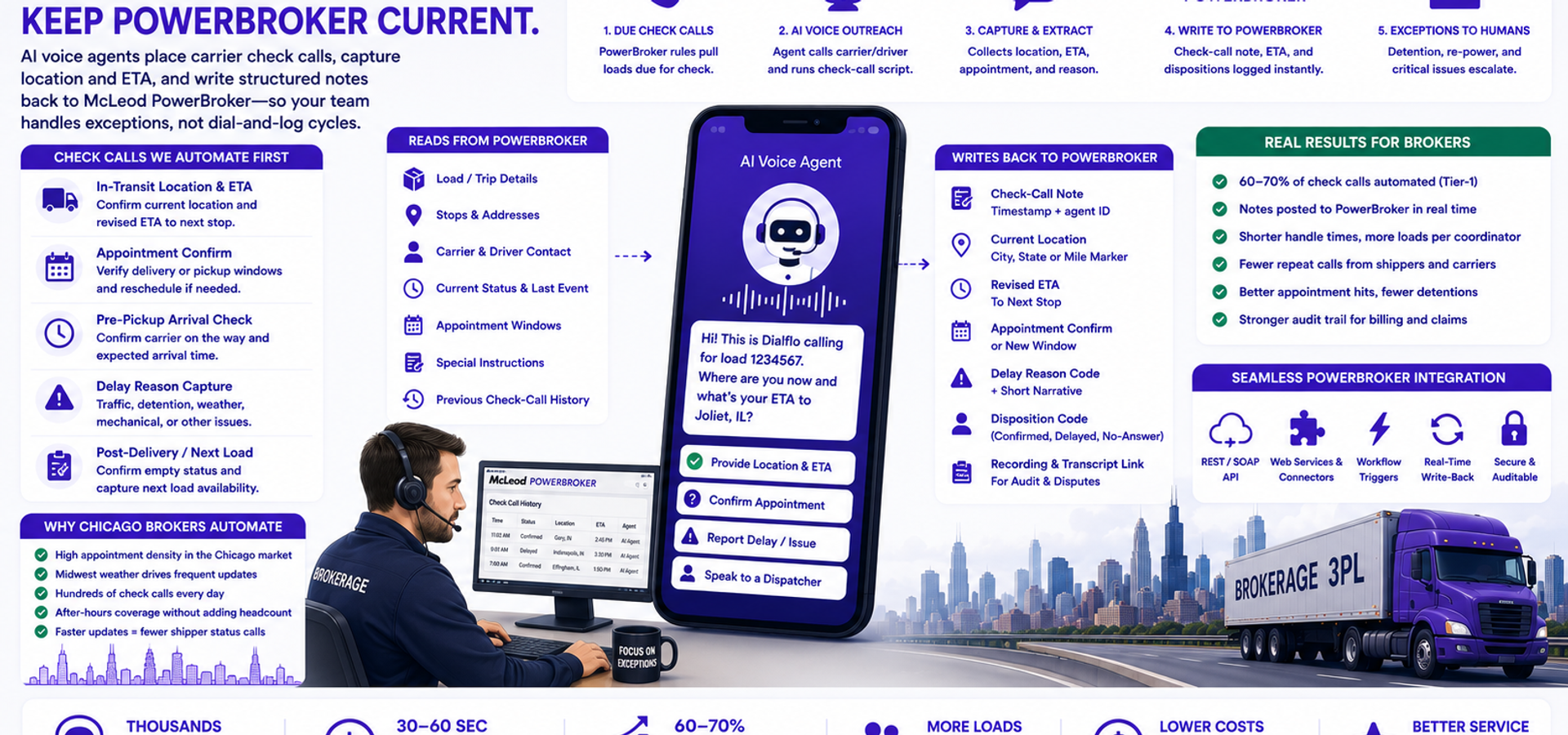
PowerBroker TMS integration for check calls typically follows this flow:
- Trigger: Load status, appointment window, or time-since-last-check rule fires outbound queue.
- Lookup: Voice AI reads load number, carrier contact, pickup/delivery stops, and last known location from PowerBroker.
- Call: Agent runs check-call script, location, ETA, appointment confirm, delay reason.
- Extract: Structured fields parsed from natural speech (e.g., “Rolling through Gary, Indiana, ETA Joliet at 4:30”).
- Write-back: Check-call note, revised ETA, and disposition posted to the load or trip record.
- Escalate: No-answer, wrong number, detention, or mechanical issue routes to human dispatch with context.
Integration depth varies by McLeod deployment, web services, middleware, or approved third-party connectors. Pilot on read-only lookup first, then enable write-back for one lane. Stack planning: build vs buy voice AI stack and technology used in supply chain management.
Check-call scripts voice AI can run at scale
Not every call needs a human opener. Tier-one carrier check calls that automate cleanly:
- in-transit location and ETA confirm
- pre-pickup arrival check (within two hours of window)
- pre-delivery arrival check
- appointment time confirm or reschedule request capture
- post-delivery empty call / next load availability intake
Keep humans on tier-two: carrier no-show, re-power, OS&D, temperature excursion, hazmat delay, shipper escalation. Conversational design: conversational services use cases and replacing phone trees with conversational voice AI.
Fields to write back into McLeod PowerBroker
Automated logging only helps if PowerBroker stays the source of truth. Minimum write-back set:
- check-call timestamp and agent ID (human or AI)
- disposition code (confirmed, delayed, no-answer, transferred)
- current city / state or lat-long if available
- revised ETA to next stop
- appointment confirm flag or new requested window
- delay reason code + short free-text note
- call recording or transcript link for disputes
If write-back lags, shippers still call, and dispatch replays the same conversation. Repeat caller rate is your data-quality signal. Related: where is my shipment calls and reducing delivery exception calls before ops.
Chicago-specific check-call automation patterns
Operators in the Chicago market often pilot automation on:
Pattern 1: Midwest linehaul in-transit: Hourly or two-hour check calls on I-55 / I-80 / I-94 lanes; high volume, repetitive script.
Pattern 2: Warehouse appointment confirm: Outbound day-before and day-of calls to carriers serving Will County and northwest Indiana DCs.
Pattern 3: Weather delay burst: Trigger extra check calls when TMS or weather rules flag storm windows, voice AI absorbs spike without temp staff.
Pattern 4: After-hours coverage: Night moves still need logged check calls; AI covers 6 p.m.–6 a.m. with morning queue clean for humans.
Peak patterns mirror general surge playbooks: handling peak season call volume without hiring dispatchers. Customer-facing follow-up at scale: 3PL customer follow-up automation.
Four-week pilot for PowerBroker check-call automation
Week 1: Baseline from McLeod reports
Export check-call volume by lane, average time-to-log, and no-answer rate. Pick one high-volume, low-complexity lane (e.g., Chicago–St. Louis dry van).
Week 2: Read-only PowerBroker integration
Voice AI pulls load, carrier phone, stops, last check. Human dispatch reviews extracted fields before write-back is enabled.
Week 3: Outbound automation live
Scheduled check calls with structured write-back to PowerBroker notes. Warm transfer on exception keywords (detention, breakdown, refused).
Week 4: Measure and expand
Compare loads per coordinator, note lag time, shipper status-call volume. Add lanes or inbound carrier callback handling if containment holds.
Metrics for McLeod PowerBroker check call automation
- check calls completed per coordinator hour
- time from call end to PowerBroker note posted
- tier-one containment rate (no human transfer)
- no-answer rate and retry success
- repeat shipper status calls within two hours
- OTIF or appointment-hit rate on pilot lane
- exception transfer rate (target: stable, not zero)
Broader AI logistics context: AI in logistics use cases, the logistics decision gap, and AI supply chain technology trends. Midwest freight volume reference: BTS statistical products.
Common failure points (and fixes)
Stale carrier phone numbers in PowerBroker: Scrub contacts before automation; bad data multiplies no-answers.
Over-automating exceptions: Detention and re-power need humans, script escalation paths early.
Notes without structure: Free-text-only write-back is hard to report on; use disposition codes plus short notes.
No after-hours handoff: Night AI logs must appear in morning PowerBroker queue with clear transfer flags.
Missed-call cost on busy desks: hidden cost of missed calls in logistics.
Where Dialflo fits
Dialflo helps Chicago freight brokers automate McLeod PowerBroker check call logging with AI voice agents that place carrier check calls, capture location and ETA in structured form, and write dispositions back to PowerBroker workflows, so dispatch teams focus on detention, re-powers, and shipper exceptions instead of dial-and-log cycles.
Pilot one Midwest lane on dialflo.ai when check-call volume outpaces coordinator capacity and PowerBroker notes consistently lag reality.
FAQ: PowerBroker check-call automation in Chicago
What is a McLeod PowerBroker check call?
Scheduled dispatch call to confirm carrier location, ETA, and appointment status, logged as a TMS note.
Can voice AI write check calls into PowerBroker?
Yes, via API or approved integration with structured fields and transcript audit.
Which calls automate first?
In-transit location/ETA confirm and appointment checks on high-volume lanes.
Does this replace Chicago dispatchers?
No, it removes repetitive logging; humans keep exceptions.
How long to pilot?
Often 2–4 weeks on one lane with read-only then write-back phases.
How does Dialflo help?
AI voice agents for PowerBroker check-call automation, see dialflo.ai.
Closing: PowerBroker stays the system of record
McLeod PowerBroker is built for brokerage operations, the gap is coordinator time, not TMS capability. Automated carrier check call logging keeps PowerBroker current with location, ETA, and appointment truth while humans handle what actually costs margin: detention, no-shows, and angry shippers. For Chicago operators running dense Midwest books, that is freight broker dispatch automation that pays back in the first weather week, not someday.
Ready to automate check-call logging into PowerBroker? Explore Dialflo for AI voice agents built for McLeod check-call workflows.